
This document is for a version of CakePHP that is no longer supported. Please upgrade to a newer release!
A Typical CakePHP Request
We’ve covered the basic ingredients in CakePHP, so let’s look at how objects work together to complete a basic request. Continuing with our original request example, let’s imagine that our friend Ricardo just clicked on the “Buy A Custom Cake Now!” link on a CakePHP application’s landing page.
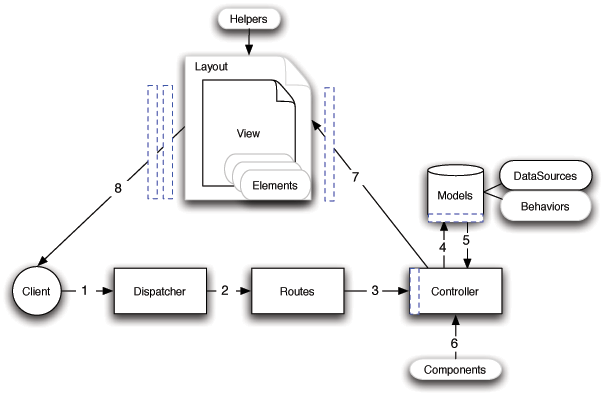
Flow diagram showing a typical CakePHP request
Figure: 2. Typical CakePHP Request.
Black = required element, Gray = optional element, Blue = callback
Ricardo clicks the link pointing to http://www.example.com/cakes/buy, and his browser makes a request to your web server.
The Router parses the URL in order to extract the parameters for this request: the controller, action, and any other arguments that will affect the business logic during this request.
Using routes, a request URL is mapped to a controller action (a method in a specific controller class). In this case, it’s the buy() method of the CakesController. The controller’s beforeFilter() callback is called before any controller action logic is executed.
The controller may use models to gain access to the application’s data. In this example, the controller uses a model to fetch Ricardo’s last purchases from the database. Any applicable model callbacks, behaviors, and DataSources may apply during this operation. While model usage is not required, all CakePHP controllers initially require at least one model.
After the model has retrieved the data, it is returned to the controller. Model callbacks may apply.
The controller may use components to further refine the data or perform other operations (session manipulation, authentication, or sending emails, for example).
Once the controller has used models and components to prepare the data sufficiently, that data is handed to the view using the controller’s set() method. Controller callbacks may be applied before the data is sent. The view logic is performed, which may include the use of elements and/or helpers. By default, the view is rendered inside a layout.
Additional controller callbacks (like
afterFilter) may be applied. The complete, rendered view code is sent to Ricardo’s browser.