
Build Better Web Applications, Faster
CakePHP 5 is a modern PHP framework running on PHP 8.5 (min. PHP 8.2) that helps you write clean, maintainable code without the complexity. Whether you're building a simple blog or a complex enterprise application, CakePHP gives you the tools to get it done right.
Perfect for
✅ Developers who value convention over configuration
✅ Teams building secure, scalable applications
✅ Projects that need to ship quickly without sacrificing quality
✅ Applications requiring modern PHP standards (PSR-7, PSR-15, PSR-17)
Why CakePHP?
🚀 Rapid Development
Scaffold applications in minutes with powerful code generation tools.
🔒 Security First
Built-in protection against SQL injection, XSS, CSRF, and more.
📦 Batteries Included
ORM, validation, caching, authentication — everything you need out of the box.
🎯 Convention over Configuration
Sensible defaults mean less setup, more coding.
Quick Start
Get a CakePHP application running in under 5 minutes:
# Create new project
composer create-project --prefer-dist cakephp/app:~5.0 my_app

# Start development server
cd my_app
bin/cake server

# Open http://localhost:8765# Setup with DDEV
mkdir my-cakephp-app && cd my-cakephp-app
ddev config --project-type=cakephp --docroot=webroot
ddev composer create --prefer-dist cakephp/app:~5.0
ddev launch# Using official PHP image
docker run -it --rm -v $(pwd):/app composer create-project \
--prefer-dist cakephp/app:~5.0 my_app
cd my_app
docker run -it --rm -p 8765:8765 -v $(pwd):/app \
-w /app php:8.2-cli php bin/cake server -H 0.0.0.0TIP
You should see a welcome page with green checkmarks at http://localhost:8765
System Requirements
Make sure your system meets these requirements before getting started:
| Component | Version |
|---|---|
| PHP | 8.2 - 8.5 |
| Database | MySQL 5.7+, PostgreSQL 9.6+, SQLite 3, SQL Server 2012+ |
| Extensions | mbstring, intl, pdo, simplexml |
| Composer | Latest |
Your First Application
Let's build a simple blog in 10 minutes! Follow along with this hands-on tutorial.
NOTE
This tutorial assumes you already have a database created. Use your database management tool to create a database named blog before proceeding.
Step 1: Configure Database Connection
Update your database credentials in config/app_local.php:
<?php
declare(strict_types=1);

return [
    'Datasources' => [
        'default' => [
            'host' => 'localhost',
            'username' => 'my_user',
            'password' => 'secret',
            'database' => 'blog',
            'encoding' => 'utf8mb4',
        ],
    ],
];Configuration Files
- config/app.php - Default configuration (committed to git)
- config/app_local.php - Local overrides (gitignored)
Step 2: Create Database Tables
Choose your preferred approach for creating the database schema:
NOTE
Migrations are recommended for team projects and production - they're version-controlled and database-agnostic.
Raw SQL is fine for quick prototyping or if you prefer direct database control.
Option A: Using Migrations
# Step 1: Generate a migration file
bin/cake bake migration CreateArticles
# This creates: config/Migrations/YYYYMMDDHHMMSS_CreateArticles.php

# Step 2: Edit the generated file to define your table structure
# See the "Migration File" tab for the complete example
# Open: config/Migrations/YYYYMMDDHHMMSS_CreateArticles.php

# Step 3: Run the migration to create the table
bin/cake migrations migrate

# Step 4: (Optional) Generate and run seed data
bin/cake bake seed Articles
bin/cake migrations seed<?php
declare(strict_types=1);
// config/Migrations/20240124000000_CreateArticles.php
use Migrations\BaseMigration;
class CreateArticles extends BaseMigration
{
public function change(): void
{
$table = $this->table('articles');
$table->addColumn('title', 'string', ['limit' => 255])
->addColumn('slug', 'string', ['limit' => 191])
->addColumn('body', 'text', ['null' => true])
->addColumn('published', 'boolean', ['default' => false])
->addColumn('created', 'datetime')
->addColumn('modified', 'datetime')
->addIndex(['slug'], ['unique' => true])
->create();
}
}<?php
declare(strict_types=1);
// config/Seeds/ArticlesSeed.php
use Migrations\BaseSeed;
class ArticlesSeed extends BaseSeed
{
public function run(): void
{
$data = [
[
'title' => 'First Post',
'slug' => 'first-post',
'body' => 'This is my first blog post!',
'published' => true,
'created' => date('Y-m-d H:i:s'),
'modified' => date('Y-m-d H:i:s'),
],
[
'title' => 'Second Post',
'slug' => 'second-post',
'body' => 'Another great article.',
'published' => true,
'created' => date('Y-m-d H:i:s'),
'modified' => date('Y-m-d H:i:s'),
],
];
$table = $this->table('articles');
$table->insert($data)->save();
}
}Option B: Using Raw SQL
USE blog;

CREATE TABLE articles (
    id INT AUTO_INCREMENT PRIMARY KEY,
    title VARCHAR(255) NOT NULL,
    slug VARCHAR(191) UNIQUE,
    body TEXT,
    published BOOLEAN DEFAULT FALSE,
    created DATETIME,
    modified DATETIME
) ENGINE=InnoDB;

INSERT INTO articles (title, slug, body, published, created, modified)
VALUES ('First Post', 'first-post', 'This is my first blog post!', TRUE, NOW(), NOW());\c blog
CREATE TABLE articles (
id SERIAL PRIMARY KEY,
title VARCHAR(255) NOT NULL,
slug VARCHAR(191) UNIQUE,
body TEXT,
published BOOLEAN DEFAULT FALSE,
created TIMESTAMP,
modified TIMESTAMP
);
INSERT INTO articles (title, slug, body, published, created, modified)
VALUES ('First Post', 'first-post', 'This is my first blog post!', TRUE, NOW(), NOW());CREATE TABLE articles (
id INTEGER PRIMARY KEY AUTOINCREMENT,
title VARCHAR(255) NOT NULL,
slug VARCHAR(191) UNIQUE,
body TEXT,
published BOOLEAN DEFAULT 0,
created DATETIME,
modified DATETIME
);
INSERT INTO articles (title, slug, body, published, created, modified)
VALUES ('First Post', 'first-post', 'This is my first blog post!', 1, datetime('now'), datetime('now'));Step 3: Generate Your First Model
Use CakePHP's code generation tool:
# Generate model classes
bin/cake bake model Articles

# Output:
# ✓ Created: src/Model/Table/ArticlesTable.php
# ✓ Created: src/Model/Entity/Article.php
# ✓ Created: tests/TestCase/Model/Table/ArticlesTableTest.phpThis creates:
<?php
declare(strict_types=1);

namespace App\Model\Table;

use Cake\ORM\Table;

class ArticlesTable extends Table
{
    public function initialize(array $config): void
    {
        parent::initialize($config);

        $this->setTable('articles');
        $this->setDisplayField('title');
        $this->setPrimaryKey('id');

        $this->addBehavior('Timestamp');
    }
}<?php
declare(strict_types=1);
namespace App\Model\Entity;
use Cake\ORM\Entity;
class Article extends Entity
{
protected array $_accessible = [
'title' => true,
'slug' => true,
'body' => true,
'published' => true,
'created' => true,
'modified' => true,
];
}Step 4: Create Your Controller
Generate a controller with views:
bin/cake bake controller Articles<?php
declare(strict_types=1);
namespace App\Controller;
class ArticlesController extends AppController
{
public function index(): void
{
$articles = $this->Articles->find('all')
->where(['published' => true])
->orderBy(['created' => 'DESC']);
$this->set(compact('articles'));
}
public function view(?string $slug = null): void
{
$article = $this->Articles
->findBySlug($slug)
->firstOrFail();
$this->set(compact('article'));
}
public function add(): void
{
$article = $this->Articles->newEmptyEntity();
if ($this->request->is('post')) {
$article = $this->Articles->patchEntity(
$article,
$this->request->getData()
);
if ($this->Articles->save($article)) {
$this->Flash->success('Article saved!');
return $this->redirect(['action' => 'index']);
}
$this->Flash->error('Unable to save article.');
}
$this->set(compact('article'));
}
}Step 5: Create Your Views
Create a simple list view in templates/Articles/index.php:
<h1>Blog Articles</h1>

<?php foreach ($articles as $article): ?>
    <article>
        <h2>
            <?= $this->Html->link(
                h($article->title),
                ['action' => 'view', $article->slug]
            ) ?>
        </h2>
        <p>
            <small>Published: <?= $article->created->format('F d, Y') ?></small>
        </p>
        <p><?= h($article->body) ?></p>
    </article>
<?php endforeach; ?>

<?= $this->Html->link('New Article', ['action' => 'add'], ['class' => 'button']) ?>TIP
Visit http://localhost:8765/articles to see your blog in action!
Next Steps
Now that you've built your first CakePHP application, here are some great places to continue your journey:
Learn the Fundamentals:
- CakePHP Conventions - Understanding the naming conventions that power CakePHP
- MVC Pattern - How CakePHP structures applications
- Configuration - Customizing your application
Build Real Applications:
- Tutorials & Examples - Step-by-step guides
- CMS Tutorial - Build a complete content management system
Master Core Features:
- Database & ORM - Advanced queries, associations, and data modeling
- Controllers - Request handling, components, and middleware
- Views - Templates, helpers, and rendering
- Security - Best practices for secure applications
Get Help
Join our community and get the support you need:
Additional Resources:
- API Documentation - Complete API reference
- Stack Overflow - Find answers to common questions
How CakePHP Works
Understanding the request flow helps you build better applications. Here's what happens when a user visits your CakePHP application:
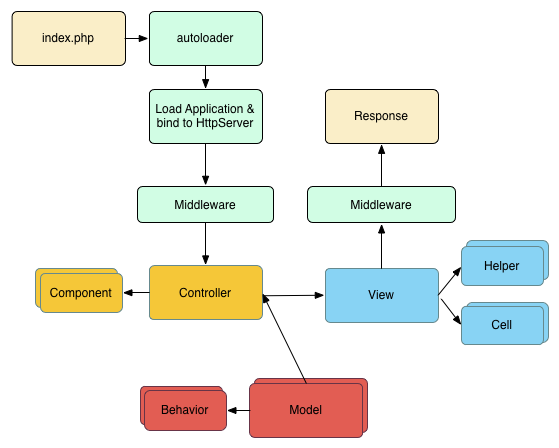
A typical request follows these steps:
- 🌐 Request arrives → Webserver routes to
webroot/index.php - ⚙️ Application boots → Your app is loaded and middleware initializes
- 🛣️ Routing → Request is matched to a controller and action
- 🎮 Controller → Action is called, interacts with Models
- 📊 Model Layer → Fetches and processes data from the database
- 🎨 View Layer → Renders the response (HTML, JSON, XML, etc.)
- 📤 Response sent → Back through middleware to the client
Understanding MVC
The Model handles your data and business logic, the Controller coordinates the request, and the View presents the data. This separation keeps your code organized and testable.
Everything You Need, Out of the Box
CakePHP comes with powerful features that save you time and help you build better applications:
🚀 Code Generation (Bake)
Generate complete CRUD applications in seconds:
bin/cake bake all Articles
# Creates: Model, Controller, Views, TestsBake can scaffold entire features, saving hours of repetitive coding. Perfect for prototyping or generating boilerplate.
💾 Caching Framework
Integrated caching with multiple backends:
// Cache expensive operations
$results = Cache::remember('expensive_query', function () {
    return $this->Articles->find('complex')->toArray();
});Supported backends: Redis, Memcached, APCu, File, Database
🧪 Built-in Testing
Write tests with confidence using the integrated testing framework:
public function testAddArticle(): void
{
    $this->post('/articles/add', ['title' => 'Test']);
    $this->assertResponseOk();
    $this->assertFlashMessage('Article saved!');
}Supports unit tests, integration tests, and browser tests out of the box.
🔐 Authentication & Authorization
Drop-in user management with flexible policies:
composer require cakephp/authentication cakephp/authorizationHandle login, permissions, and access control with minimal configuration.
🌐 REST API Support
Build APIs with automatic content type negotiation:
// Automatically serves JSON/XML based on Accept header
public function index()
{
    $articles = $this->Articles->find('all');
    $this->set('articles', $articles);
    $this->viewBuilder()->setOption('serialize', ['articles']);
}Supports JSON, XML, and custom formats with minimal code.
📦 Database Migrations
Version control your database schema:
bin/cake bake migration CreateArticles
bin/cake migrations migrateKeep your database changes in sync across development, staging, and production.
What Makes CakePHP Special?
<?php
declare(strict_types=1);

// No configuration needed! CakePHP automatically knows:
// - ArticlesController uses ArticlesTable
// - ArticlesTable uses 'articles' database table
// - Primary key is 'id'
// - Foreign keys end in '_id'
// - Templates are in templates/Articles/

class ArticlesController extends AppController
{
    // That's it! Table is auto-loaded
    public function index(): void
    {
        $articles = $this->Articles->find('all');
        $this->set(compact('articles'));
    }
}<?php
declare(strict_types=1);
// Elegant query building with relationships
$popularArticles = $this->Articles->find()
->contain(['Users', 'Comments'])
->matching('Tags', function ($q) {
return $q->where(['Tags.name IN' => ['PHP', 'CakePHP']]);
})
->where(['Articles.published' => true])
->orderBy(['Articles.view_count' => 'DESC'])
->limit(10);<?php
declare(strict_types=1);
// Automatic protection against common vulnerabilities:
// ✓ SQL Injection (parameterized queries)
// ✓ CSRF attacks (token validation)
// ✓ XSS (auto-escaping in templates)
// ✓ Mass assignment (protected fields)
$article = $this->Articles->newEntity($data);
// Only $_accessible fields can be set# Generate complete CRUD in seconds
bin/cake bake all Articles
# Creates:
# ✓ Model (Table + Entity)
# ✓ Controller (with all actions)
# ✓ Templates (index, view, add, edit)
# ✓ Tests (full coverage)
Ready to Build Something Amazing?
Start your CakePHP journey today and join thousands of developers building modern web applications.